What Is Ergonomic Workspace Design?
Ergonomic workspace design is more than an adjustable chair beside a polished desk. It is a practical method for matching furniture, tools, lighting, and movement with human needs. The goal is simple: reduce unnecessary strain while supporting focused, sustainable work. A monitor should sit near eye level. Feet should rest firmly on the floor. A keyboard should allow relaxed shoulders and neutral wrists.
The scale of this issue is substantial. The World Health Organization reports that musculoskeletal conditions affect approximately 1.71 billion people worldwide. Its findings connect these conditions with pain, reduced mobility, and lost productivity. The International Labour Organization also identifies work-related musculoskeletal disorders as a major occupational health concern. These reports strengthen the case for thoughtful workplace planning. Yet, statistics alone cannot reveal how a worker feels after six hours at a poorly adjusted desk.
Practical guidance from the U.S. Occupational Safety and Health Administration recommends neutral postures, suitable workstation height, and regular position changes. The National Institute for Occupational Safety and Health similarly emphasizes reducing repetitive stress and awkward reach distances. Industry research adds another layer. Steelcase’s Global Report found that 87% of employees wanted more choice in where and how they worked. That preference challenges fixed workstation assumptions. A quiet corner may help one employee concentrate, while another needs a sit-stand desk and brighter task lighting. Design is not perfect. Even well-planned spaces require observation, feedback, and adjustment. A successful ergonomic workspace design therefore treats comfort as measurable, personal, and continuously improvable.
Definition and Core Principles of Ergonomic Workspace Design
What Is Ergonomic Workspace Design?
Definition and Core Principles of Ergonomic Workspace Design
Ergonomic workspace design means shaping a work area around human movement, comfort, and safety. It reduces unnecessary strain while supporting focused, efficient work. The core principles include neutral posture, suitable work heights, clear visibility, easy reach, and regular movement. A reliable design also considers the worker’s tasks, body dimensions, daily habits, and physical environment.
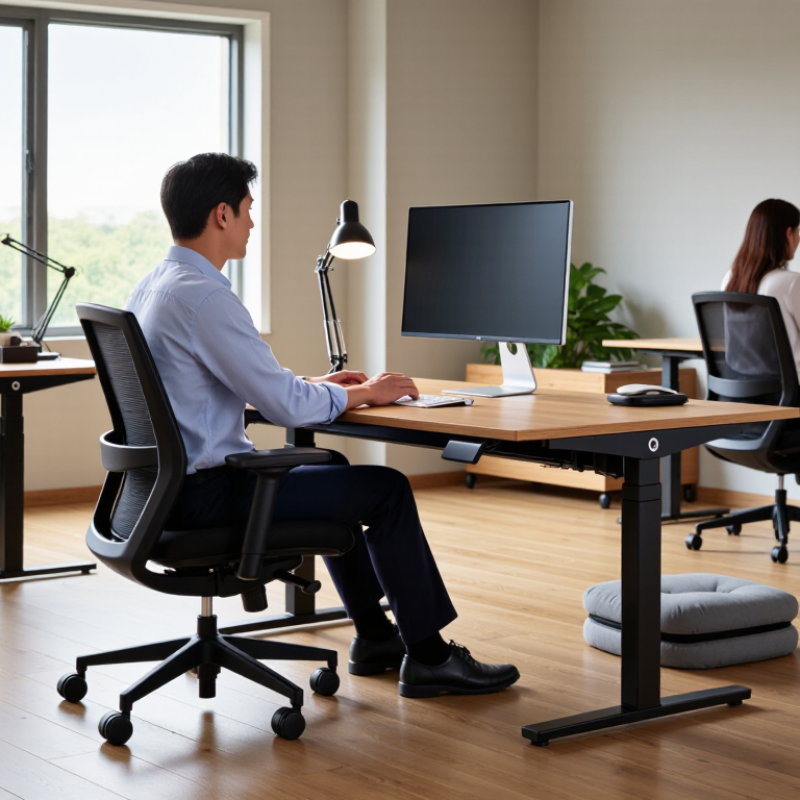
In practice, adjust the chair so your feet rest firmly on the floor. Keep the screen near eye level, about an arm’s length away. Your elbows should remain close to your body. Place frequently used items within easy reach. Good lighting should reveal documents without creating screen glare.
During workstation reviews, small changes often produce noticeable relief. However, no setup works perfectly forever. A chair may feel comfortable in the morning and restrictive later. That discomfort deserves attention, not dismissal. The best design remains adjustable and open to correction.
Tips:
- Change one feature at a time.
- Set a timer for brief movement breaks.
- Stand briefly.
- Notice shoulder tension, wrist angle, and lower-back pressure.
- Photograph your usual posture for honest review.
- Ask whether the workspace supports your actual routine, not an idealized one.
- Even expert guidance needs personal testing.
- Comfort is evidence, but it is not the only measure.
- Pain, numbness, or persistent fatigue may require qualified professional advice.
Key Elements of an Ergonomic Workstation
What Is Ergonomic Workspace Design?
Key Elements of an Ergonomic Workstation
An ergonomic workstation supports your body during repeated tasks. It does not force one “perfect” posture. Instead, it allows small, frequent adjustments. Your chair should support your lower back and let your feet rest flat. Keep your knees near hip level. Leave two fingers of space behind each knee. Armrests should let your shoulders relax, not lift. Small changes help.
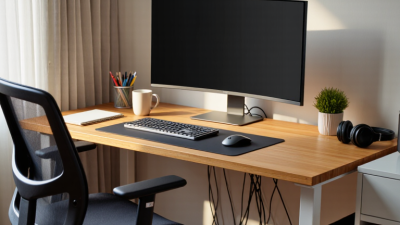
Place the screen directly in front of you. Its top edge should sit around eye level. Keep it about an arm’s length away. A separate keyboard and mouse can reduce awkward wrist angles. Keep both close to your body. Your elbows should stay near ninety degrees. Avoid pressing your wrists against sharp desk edges. A document holder may help if reading occupies much of your day.
Lighting matters too. Put the brightest light beside the screen, not behind it. This reduces glare and squinting. Adjust the chair, screen, and input devices together. One change can create another problem. I once raised a monitor too high and strained my neck while improving my posture. That mistake changed my approach. I now check comfort after several work tasks, not after one minute. Movement also matters. Stand, walk, or stretch briefly every thirty to sixty minutes. Pain, numbness, or persistent fatigue deserves professional assessment. Ergonomic guidance improves comfort but cannot replace individualized medical advice.
How to Assess Workspace Ergonomics
What Is Ergonomic Workspace Design?
How to Assess Workspace Ergonomics
Ergonomic workspace design adapts work to the person, not the other way around. Assess your workspace during normal tasks, not only when it looks tidy. Keep your monitor about an arm’s length away, with its top near eye level. Your elbows should rest close to your body, forming an angle near 90 degrees. Keep both feet supported by the floor or a stable footrest. A small gap behind your knees can reduce pressure.
Tips: Observe your posture for ten minutes. Notice raised shoulders, bent wrists, or frequent leaning. Adjust one feature at a time, then reassess after several work sessions. Move the screen before buying new furniture. Use a rolled towel temporarily to test lower-back support. Simple tests reveal more than appearance.
Check lighting, noise, and movement as well. Reflections on the screen may cause squinting and forward leaning. A clear walkway encourages brief movement between tasks. Change position regularly, even when your setup seems correct. Discomfort, numbness, or persistent pain deserves attention from a qualified healthcare professional or ergonomics specialist. No checklist is perfect. Individual height, vision, workload, and previous injuries affect the assessment. I would question any “ideal” setup that ignores these differences. A comfortable position today may become tiring after four hours. Reassess when your duties, equipment, or body changes.
Health and Productivity Benefits of Ergonomic Workspaces
What Is Ergonomic Workspace Design?
Health and Productivity Benefits of Ergonomic Workspaces
Ergonomic workspace design matches tools, furniture, and routines to human movement. A screen should sit near eye level, not below it. Feet need stable support, while elbows remain close to the body. These details can reduce neck strain, wrist pressure, and lower-back fatigue. The UK Health and Safety Executive reported 543,000 workers with work-related musculoskeletal disorders in 2023/24. These conditions caused 7.8 million lost working days. The numbers show a health issue and a productivity problem.
The benefits extend beyond physical comfort. A well-adjusted workstation can reduce painful interruptions and support longer periods of focused work. The Chartered Institute of Personnel and Development’s 2024 workplace report lists musculoskeletal problems among major causes of long-term absence. Short movement breaks also matter. Stand briefly. Change posture. Look away from the screen. A perfect posture is unrealistic, and rigid advice can create new tension. In practice, small adjustments often work better than expensive redesigns. I have sometimes noticed discomfort only after several hours, which suggests that comfort checks should happen during real tasks, not just during setup. Managers should review workstations with employees, especially when duties, equipment, or working locations change.